Scenario
You might have seen code like this, that blocks certain document types from being deleted.
/// A common use case: prevent certain document types being deleted
public class LockedDocumentContentMovingToRecycleBinNotificationHandler : INotificationHandler<ContentMovingToRecycleBinNotification>
{
    public static string[] LOCKED_ALIASES = ["home", "error"];
    public static Guid[] LOCKED_IDS = [
      Guid.Parse("a95360e8-ff04-40b1-8f46-7aa4b5983096"),
      Guid.Parse("9db112c5-c2ea-441d-8bd4-6daf522aa2b6")
    ];
    public void Handle(ContentMovingToRecycleBinNotification notification)
    {
        foreach (var item in notification.MoveInfoCollection)
        {
            if (Array.Exists(LOCKED_ALIASES, alias => alias.Equals(item.Entity.ContentType.Alias, StringComparison.OrdinalIgnoreCase)))
            {
                notification.CancelOperation(new EventMessage(
                  $"{item.Entity.Name} cannot be trashed",
                  $"The content item '{item.Entity.Name}' is of type '{item.Entity.ContentType.Name}' which cannot be trashed.",
                  EventMessageType.Error));
            }
        }
    }
}
But wouldn't it be nice to show this in the backoffice before trying to delete an item?
Flagging content items
The custom signs can be configured to show for items that have a certain "flag". This is also a new feature of Umbraco 17. (The only use I'm aware of for flags at the moment is for custom entity signs, but perhaps this will change in the future!)
using Umbraco.Cms.Core;
using Umbraco.Cms.Api.Management.Services.Flags;
using Umbraco.Cms.Api.Management.ViewModels;
using Umbraco.Cms.Api.Management.ViewModels.Document.Collection;
using Umbraco.Cms.Api.Management.ViewModels.Document.Item;
using Umbraco.Cms.Api.Management.ViewModels.Tree;
using My.UmbracoBackofficeExtensions.Notifications;

namespace My.UmbracoBackofficeExtensions
{
    // Created a C# class that implements `IFlagProvider`
    public class LockedDocumentFlagProvider : IFlagProvider
    {
        // We'll use this alias in the custom sign configuration
        private const string Alias = Constants.Conventions.Flags.Prefix + "My.Locked";

        // Indicate that this flag provider only provides flags for documents.
        public bool CanProvideFlags<TItem>()
            where TItem : IHasFlags =>
            typeof(TItem) == typeof(DocumentTreeItemResponseModel) ||
            typeof(TItem) == typeof(DocumentCollectionResponseModel) ||
            typeof(TItem) == typeof(DocumentItemResponseModel);

        // Implemented the `PopulateFlags` method which is just looping through each item and checking it in the `ShouldAddFlag` method.
        public Task PopulateFlagsAsync<TItem>(IEnumerable<TItem> itemViewModels)
            where TItem : IHasFlags
        {
            foreach (TItem item in itemViewModels)
            {
                if (ShouldAddFlag(item))
                {
                    item.AddFlag(Alias);
                }
            }

            return Task.CompletedTask;
        }

        // We just get the ID of the document type and check it against our list of IDs we don't allow being deleted
        private bool ShouldAddFlag<TItem>(TItem item)
        {
            Guid id;
            switch (item)
            {
                case DocumentTreeItemResponseModel dti:
                    id = dti.DocumentType.Id;
                    break;
                case DocumentCollectionResponseModel dc:
                    id = dc.DocumentType.Id;
                    break;
                case DocumentItemResponseModel di:
                    id = di.DocumentType.Id;
                    break;
                default:
                    return false;
            }

            return LockedDocumentContentMovingToRecycleBinNotificationHandler.LOCKED_IDS.Contains(id);
        }
    }
}
This provider also needs registering in a composer.
public class LockedDocumentComposer : IComposer
{
    public void Compose(IUmbracoBuilder builder)
    {
        builder.SignProviders()
            .Append<LockedDocumentFlagProvider>();

        // Our existing logic to disallow deleting the document deletion
        builder.AddNotificationHandler<ContentMovingToRecycleBinNotification, LockedDocumentContentMovingToRecycleBinNotificationHandler>();
    }
}
Configuring the custom entity sign
The entity sign is configured in a backoffice extension. If you're already extending the backoffice and have a manifests file already, please read on. Otherwise, I've written about extending the backoffice in my Template for Success article on 24 Days in Umbraco.
Once the flag is in place, entity signs only require a manifest to configure them, no JavaScript required:
import { UMB_DOCUMENT_ENTITY_TYPE } from '@umbraco-cms/backoffice/document';

export const manifests: Array<UmbExtensionManifest> = [
  // ...
  // Adding a new manifest of type `enitiySign` and kind `icon`
  {
    type: 'entitySign',
    kind: 'icon',
    alias: 'Umb.EntitySign.Document.My.Locked',
    name: 'Is Locked Document Entity Sign',
    // Specifying which enties can show this sign, documents
    forEntityTypes: [UMB_DOCUMENT_ENTITY_TYPE],
    // Specify what entities should be "flagged" with to make the sign show
    forEntityFlags: ['Umb.My.Locked'],
    // Can only show 2 icons at once, so the weighting matters. `-1000` means this one is really unimportant!
    weight: -1000,
    meta: {
      // Specifying what the sign looks like
      iconName: 'icon-lock',
      label: 'Locked',
      iconColorAlias: 'red',
    }
    // You'll notice we don't link to a TS file! Flagging is purely a C# concern
  }
];
The result
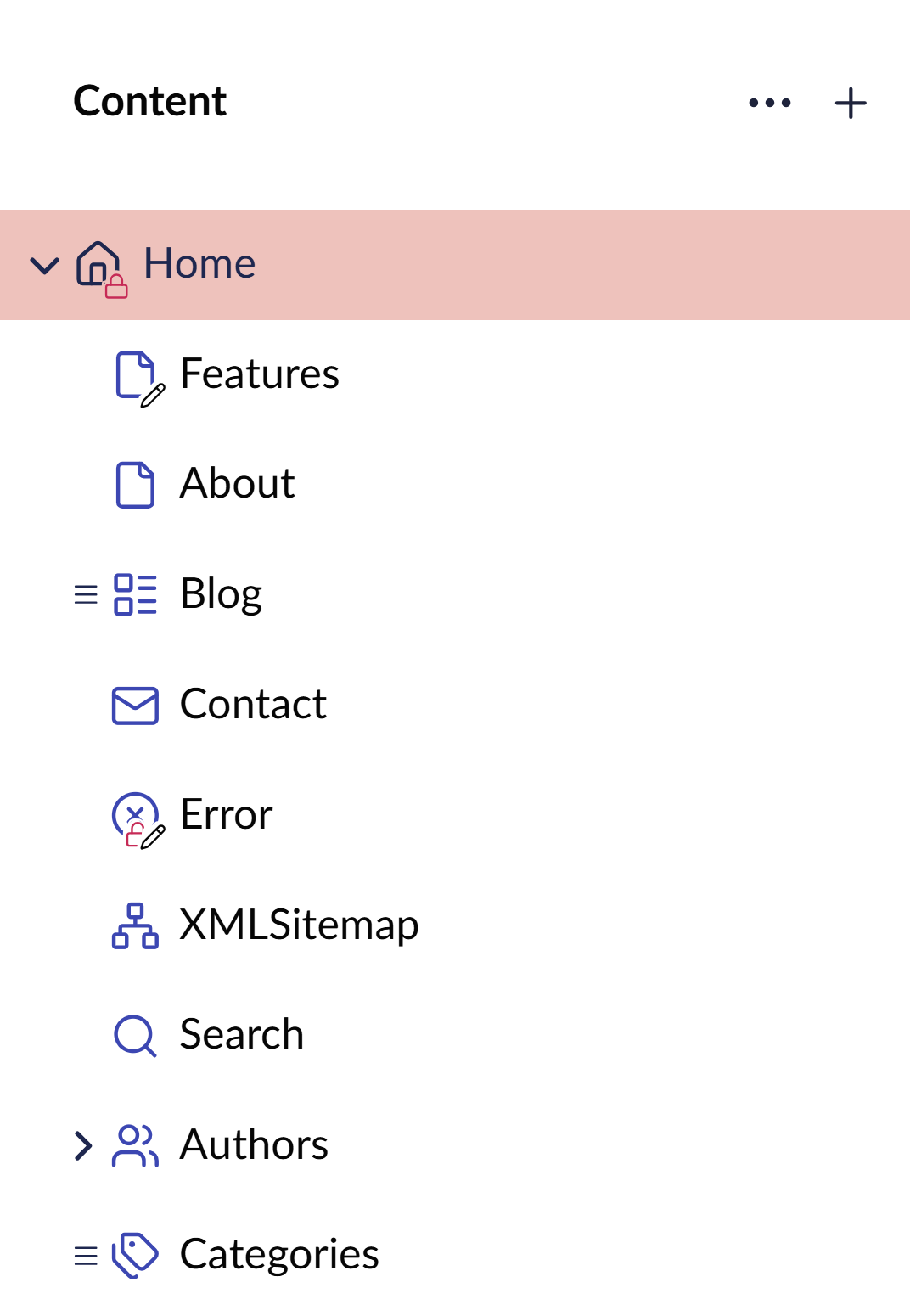
As you can see in the screenshot below, Home and Error are locked and have our new red padlock custom entity sign, while Features and Error have unpublished changes with the default pencil entity sign and Error has both, sorted by priority.
This is an example of what entity signs could be used for, but hopefully you can now imagine many more uses! And not just document types either!